
Last updated on
Oct 31, 2026
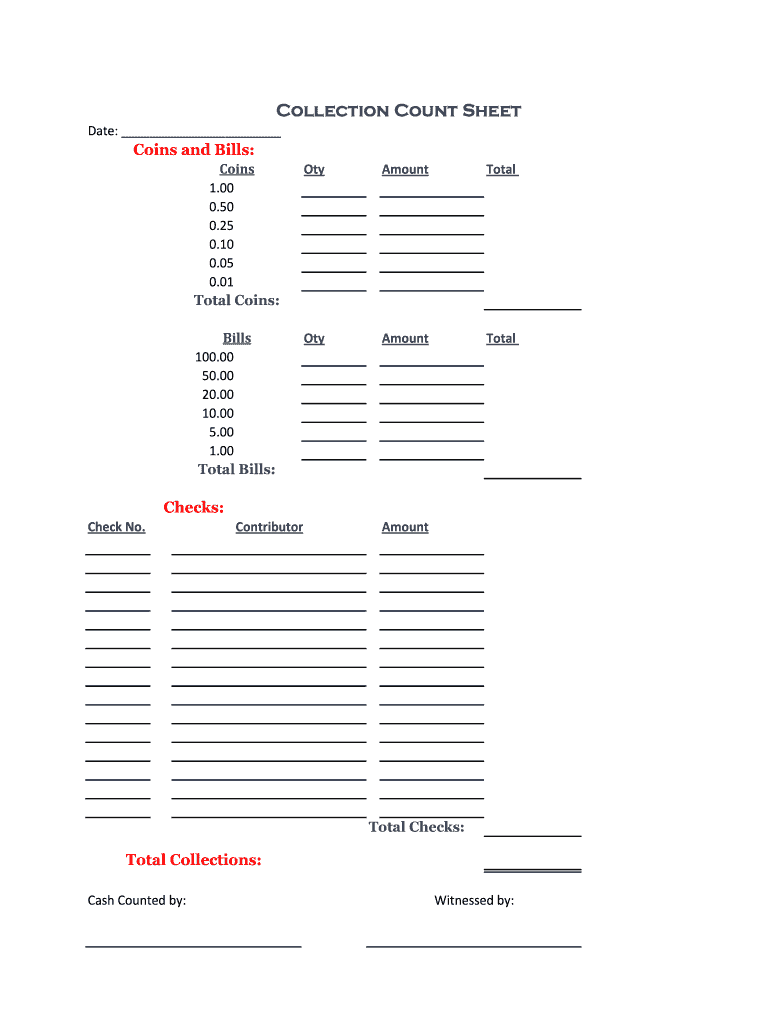
Collection Count Sheet free printable template
pdfFiller is not affiliated with any government organization

Fill out
Complete the form online in a simple drag-and-drop editor.

eSign
Add your legally binding signature or send the form for signing.

Share
Share the form via a link, letting anyone fill it out from any device.

Export
Download, print, email, or move the form to your cloud storage.
Why pdfFiller is the best tool for your documents and forms


End-to-end document management
From editing and signing to collaboration and tracking, pdfFiller has everything you need to get your documents done quickly and efficiently.
Accessible from anywhere
pdfFiller is fully cloud-based. This means you can edit, sign, and share documents from anywhere using your computer, smartphone, or tablet.
Secure and compliant
pdfFiller lets you securely manage documents following global laws like ESIGN, CCPA, and GDPR. It's also HIPAA and SOC 2 compliant.
What is Collection Count Sheet
The Collection Count Sheet is a financial document used by businesses to accurately record and summarize cash collections of coins, bills, and checks.
pdfFiller scores top ratings on review platforms




Wonderful--Works across platforms, all around outstanding product!! Dr. T.
easy to use great access. unless the internet is down.
Who needs Collection Count Sheet?
Explore how professionals across industries use pdfFiller.

Collection Count Sheet is needed by:
-
Retail Managers responsible for cash handling
-
Bank Employees managing transactions
-
Event Coordinators overseeing ticket sales
-
Accountants preparing financial reports
-
Small Business Owners tracking revenue
Comprehensive Guide to Collection Count Sheet
What is the Collection Count Sheet?
The Collection Count Sheet serves as a vital financial document designed to record and summarize the collection of coins, bills, and checks. It is widely used in various contexts, including cash handling in retail environments, banking operations, and event management scenarios. This document typically includes essential fields such as the quantities and amounts of coins and bills, check details, and identifying names of the individuals involved in the counting process.
Purpose and Benefits of the Collection Count Sheet
This document aids organizations in accurately recording their collections, which enhances transparency and accountability in financial reporting. By utilizing a standardized financial report template, businesses that manage cash transactions can benefit significantly. The Collection Count Sheet not only serves to streamline cash handling processes but also supports financial integrity by ensuring that every transaction is documented effectively.
Key Features of the Collection Count Sheet
The form comprises several fillable fields, including 'Date: _______________________,' 'Coins Oty Amount Total,' and 'Bills Oty Amount Total.' Additionally, it contains signature lines for both the individual counting the cash and a witness to validate the process. Users can take advantage of built-in calculation functions that aid in determining the total collections, making it an essential cash handling form for various scenarios.
Who Needs the Collection Count Sheet?
Primary users of the Collection Count Sheet include retailers, banks, and event managers who frequently handle cash. Typical scenarios where this form becomes essential include cash reconciliations at the end of a retail day, event cash management, and even bank transactions. Accurate documentation of cash collections can significantly benefit any business or organization that requires precise financial records.
How to Fill Out the Collection Count Sheet Online (Step-by-Step)
-
Access the Collection Count Sheet on a compatible digital platform.
-
Enter data for coins, bills, and checks in their respective fields.
-
Review all fields to ensure accuracy before submitting the form.
Common Errors and How to Avoid Them
When filling out the Collection Count Sheet, common mistakes can lead to inaccuracies in financial reporting. It is advisable to follow best practices for reporting and validation, ensuring that all data entries are double-checked—especially the numerical totals. Implementing a thorough review process can mitigate these errors, leading to reliable financial documentation.
How to Sign the Collection Count Sheet
The signing requirements of the Collection Count Sheet can vary, with options for digital or wet signatures. Signatures are fundamental for the authenticity of the document. To eSign, users can utilize platforms like pdfFiller, which simplifies the signing process while maintaining security and compliance.
Submission Methods and Best Practices
Submitting the completed Collection Count Sheet can be done through various methods tailored to the organization's needs. Best practices for delivering this document include confirming submission through additional channels and tracking its status, if available, to ensure that it reaches the intended destination securely.
Security and Compliance for the Collection Count Sheet
Utilizing pdfFiller to manage your Collection Count Sheet benefits from robust security measures, including encryption compliant with regulations such as HIPAA and GDPR. Ensuring data protection is crucial when handling sensitive financial documents. Users should follow best practices for managing information securely during the filling and submission phases.
Creating and Managing Your Collection Count Sheets with pdfFiller
pdfFiller streamlines the form-filling process, offering features like editing, eSigning, and sharing options for users. By leveraging pdfFiller's capabilities, managing the Collection Count Sheet becomes efficient and user-friendly. Users are encouraged to explore these features for an improved document management experience.
How to fill out the Collection Count Sheet
-
1.Access the Collection Count Sheet on pdfFiller by searching for it in the templates section or using the provided link.
-
2.Once the form is open, familiarize yourself with all fillable fields, including those for coins, bills, checks, and signatures.
-
3.Before filling out the form, gather necessary information: count the coins and bills you have on hand and any checks you need to report.
-
4.Begin by entering the date of the cash count at the designated field at the top of the form.
-
5.Next, for the coins section, input the quantity and amount for each denomination in the provided fields, ensuring accuracy.
-
6.Proceed to the bills section, where you will similarly detail the quantity and amount for each bill denomination.
-
7.For checks received, fill in details including the check number, contributor’s name, and the amount in the designated section.
-
8.Once you have filled in all the details, review the entries carefully to ensure accuracy and completeness.
-
9.After verifying the information, sign in the designated field for 'Cash Counted by:' and ensure another person witnesses the count if required.
-
10.To finalize, save your work on pdfFiller. You can download the completed form or submit directly through the platform’s submission options.

Who should use the Collection Count Sheet?
The Collection Count Sheet is ideal for anyone involved in cash handling like retail managers, bank employees, and accountants who require accurate financial reporting.
What information is needed to complete the form?
Before starting, gather the total counts of coins and bills, checks received, and the names of individuals involved in the cash count process to complete the form accurately.
How do I submit the completed Collection Count Sheet?
You can submit the completed Collection Count Sheet through pdfFiller’s submission options or download it for manual submission as required by your organization.
Are there common mistakes to avoid when filling out this form?
Ensure accuracy in the counts of coins, bills, and check details. Double-check signatures and witness information to avoid processing issues.
Is there a deadline for submitting the Collection Count Sheet?
While specific deadlines may vary, timely submission after cash handling events is generally recommended to maintain accurate financial records.
What should I do if I make a mistake on the form?
If you make a mistake, you can either correct it directly in the fillable fields on pdfFiller or restart the document to ensure accurate reporting.
Can the Collection Count Sheet be notarized?
Notarization is not required for the Collection Count Sheet unless specified by your organization. Confirm requirements before submission.
Related Content
Related Forms




Related Catalogs
Get the latest insights from our blog



If you believe that this page should be taken down, please follow our DMCA take down process
here
.
This form may include fields for payment information. Data entered in these fields is not covered by PCI DSS compliance.